.svg)
Solutions
Features
Resources
.svg)
Trusted by 2,000+ operators
"Whether you have a smaller listing count or a larger one, Uplisting is easy to use, and it's scalable."
Josh Kristoff
Nomad Capital Adventures

4.8/5

4.9/5
Log in to your account
"Whether you have a smaller listing count or a larger one, Uplisting is easy to use, and it's scalable."
Josh Kristoff
Nomad Capital Adventures
Log in to your account

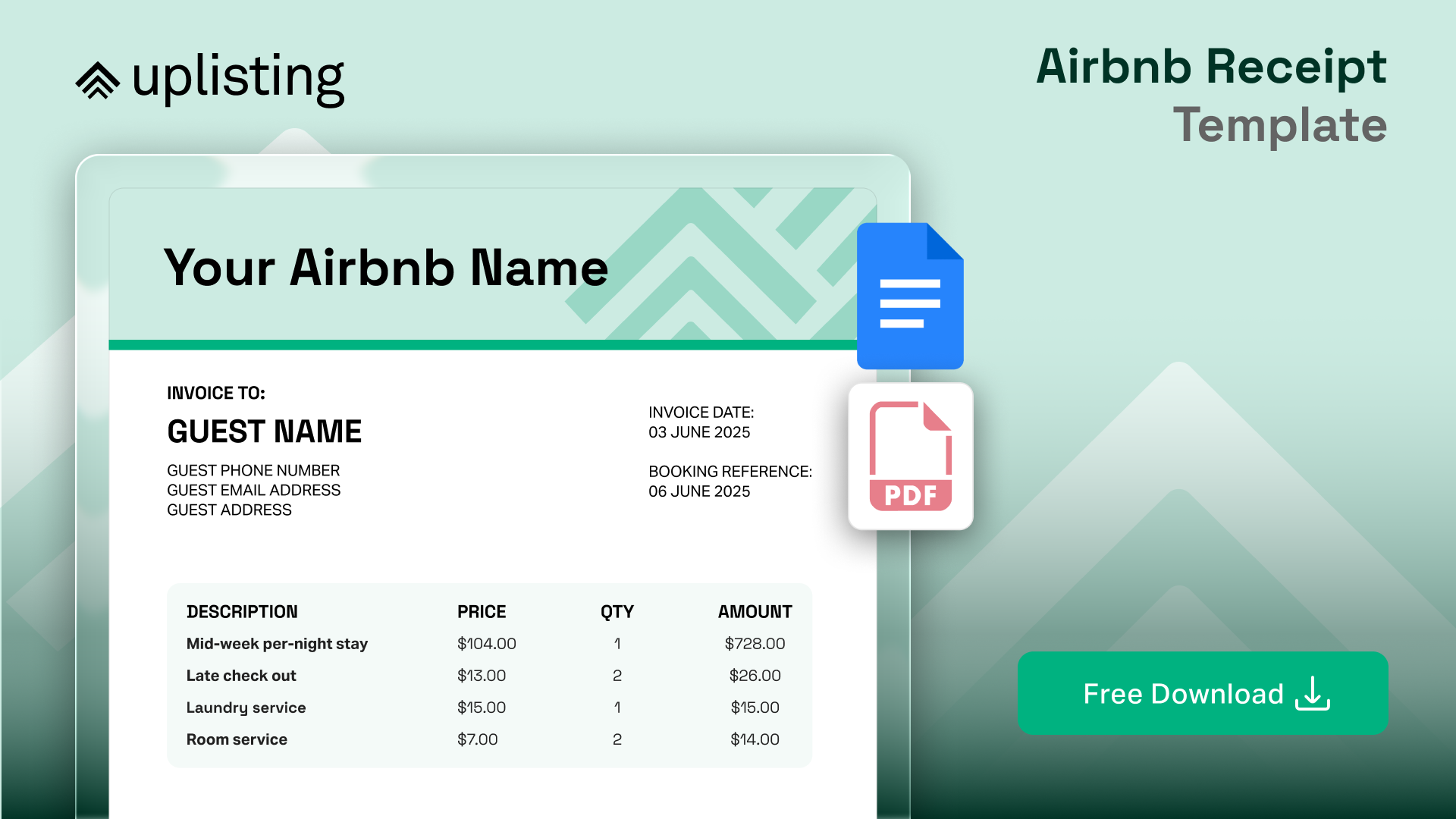
Whether you need a foolproof invoicing system for your direct booking website or you want to improve on the Airbnb's limited default receipt, this template has you covered.
You'll receive a google doc link that can easily be edited or you can download it directly as a PDF.
Receipts are one of those hosting tasks that only get attention when something goes wrong. A guest needs documentation for work, an accountant asks for clearer records, or tax season rolls around and numbers don’t line up.
Airbnb provides a basic receipt, but for many hosts, especially those taking direct bookings, hosting business travelers, or operating across multiple platforms, that default document quickly shows its limits. Missing fields, no branding, and little flexibility make it harder than it should be to run a clean, professional operation.
This guide explains why Airbnb receipt templates matter, when you should use one, and how to apply our free, ready-to-use Airbnb receipt template without adding extra admin. By the end, you’ll know exactly how to issue clear, professional receipts that guests trust and accountants appreciate.
Receipts might feel like a small detail, but for hosts, they quietly sit at the centre of trust, professionalism, and compliance.
For guests, especially business travelers, a clear receipt is often non-negotiable. They need documentation that shows who they paid, what they paid for, and how charges were broken down. When that information is missing or unclear, it leads to follow-up emails, awkward explanations, and unnecessary friction after checkout.
For hosts, receipts act as a paper trail. A clear, itemized Airbnb receipt template lays out everything: nightly rates, cleaning fees, taxes, and any extras. They support accurate bookkeeping, make tax reporting easier, and provide protection if a payment is ever questioned. When receipts are inconsistent, incomplete, or scattered across platforms, things get messy fast, particularly for hosts managing multiple properties or taking bookings outside Airbnb.
There’s also a credibility factor. A clean, well-structured receipt signals that your hosting business is organised and professional. It reassures guests that they’re dealing with someone who takes their operation seriously, not just a spare room with a login. Over time, that professionalism builds trust, encourages repeat bookings, and reduces disputes.
In short, receipts are not just admin. They’re part of the guest experience, part of your financial hygiene, and part of how your hosting business scales without stress.
Most hosts rely on Airbnb’s built-in receipt system by default. It works fine for simple bookings, but it wasn’t designed for hosts who take direct payments, manage multiple properties, or need documentation that stands up to accounting or tax scrutiny.
Here’s how the two compare.
Airbnb receipts are intentionally standardized. That’s fine when everything runs through the platform, but it leaves hosts with little control. You can’t add branding, adjust line items, or include additional context that guests, accountants, or employers often need.
There’s also no flexibility for VAT numbers, business registration details, or custom notes. For hosts operating in tax-heavy regions or managing bookings outside Airbnb, this creates gaps that lead to follow-up emails and manual fixes.
A custom template gives hosts ownership over their documentation. You control the layout, the language, and the details included, which makes receipts easier for guests to understand and easier for you to reuse.
The downloadable template is designed specifically to solve these issues. It keeps receipts consistent across every booking, works just as well for direct stays as Airbnb ones, and presents your hosting business as professional and well-organized. Most importantly, it reduces back-and-forth by giving guests everything they need the first time.
Control the layout, language, and details included in your Airbnb receipt for guests. One editable template that can be reused again and again.
The free Airbnb receipt template is designed to give hosts full control over how their booking receipts look, read, and function. Instead of relying on a one-size-fits-all platform receipt, this template gives you a structured, professional document you can reuse across every stay.
Here’s how it’s laid out.
At the top of the template, you’ll add your host or business information. This includes your name or company name, contact details, and space for branding such as a logo. If you operate as a registered business, there’s room to include tax or registration details where needed.
This section establishes credibility immediately and makes the receipt usable for accounting, reimbursements, and official records.
The next section captures guest-specific details such as the guest name, booking reference, and stay dates. This ensures the receipt clearly ties the payment to a specific booking, which is especially important for business travelers and direct bookings.
Everything is laid out clearly so guests can quickly understand what the receipt relates to, without follow-up questions.
Each receipt includes space for property information, making it easy to use the same template across multiple listings. Whether you manage one home or several, this section helps keep records organised and avoids confusion when reviewing bookings later.
This is the core of the template. The itemised table allows you to break down nightly rates, cleaning fees, extra services, discounts, and any other charges clearly. Instead of a single total, guests and accountants can see exactly how the final amount was calculated.
The structure is flexible, so you can add or remove line items depending on the booking.
For hosts operating in regions with occupancy taxes, VAT, or other local charges, the template includes dedicated space to show these separately. This helps avoid misunderstandings and makes the receipt suitable for tax reporting and expense claims.
This section shows what has already been paid and whether any balance remains. It’s particularly useful for longer stays, deposits, or staged payments, and keeps everything transparent for both host and guest.
At the bottom of the template, there’s space for optional notes, disclaimers, or additional terms. Hosts can use this to clarify payment methods, reference booking conditions, or add brief explanations when needed.
The template is intentionally modular, editable, and reusable.
You can adjust sections to match your booking style, remove anything you don’t need, and reuse the same structure for every stay. Once set up, it becomes a reliable part of your hosting workflow rather than another document you rebuild each time.

Hosts know the right Airbnb receipt template sets the tone for every stay, and what works for one host may not work for another.
Below are three popular approaches, each designed with a specific workflow in mind and each matching up with the downloadable template you'll find at the bottom of this blog.
Some days, a clean receipt is all you want.
Minimal layouts use streamlined tables, limited color, and a simple font to keep edits fast. You’ll see clear fields for names, addresses, booking dates, and a direct charges summary.
Nothing distracts from the details. For hosts running lean on time, a minimal format cuts busywork and avoids confusion. The result is a document that’s always guest-ready, never overdone.
First impressions matter, especially with repeat guests or direct bookings.
Brand-friendly templates let you upload a logo, use your company colors, and display contact info front and center. Each template includes spaces for property names, emails, and phone numbers, so everything feels unified.
Guests see a polished record, and your operation looks organized from invoice number to thank you note. Consistency lands every time, no matter how many properties you manage.
Nobody got into short-term rentals for the paperwork!
Automated receipt generators fill in property details, guest info, and payment history using stored data, cutting out repetitive typing.
Connect the template to your property management system, and fields like booking ID, stay dates, and transaction IDs fill themselves. The “Payments Received” and “Balance Due” tables in the downloadable asset sync beautifully here. With this approach, hosts can produce a complete, branded Airbnb receipt template in seconds, giving you more time to focus on growing revenue and less time correcting spreadsheets.
So, once you've downloaded the template, here's how you can get started to implement it in your workflow.
Download the free Airbnb receipt template, then save a clean “master” version you never edit. Create a second copy for each booking so you always have a fresh starting point.
Add your name or business name, email, phone number, business address, and any tax details you use (like a VAT or tax ID). If you use a logo, drop it into the header so every receipt looks consistent.
Enter the guest’s full name and contact details, plus the booking channel (Airbnb, Vrbo, direct booking, etc.). Add the reservation reference if you have one, and include the payment method used.
Add the property name (or internal label), full address, check-in and check-out dates, and number of guests. This is the section that keeps accountants happy and avoids “Which stay was this for?” emails later.
List each fee as its own line item, so it’s easy to scan: nightly rate, number of nights, cleaning fee, extra guest fees, pet fee, parking, late checkout, damage deposit (if applicable). Make sure quantities and totals match what the guest paid.
If you charge occupancy tax, VAT, sales tax, or local fees, list them separately and label them clearly. This is especially helpful for international guests and business travelers filing expense claims.
Fill in the payments section with the date, amount, and payment method (and transaction ID if you have it). Double-check the final total, then confirm the balance due is correct (usually $0 if already paid).
Use the notes section for anything that prevents confusion, like “Receipt issued for accommodation only,” “Damage deposit is refundable subject to inspection,” or “Taxes are included in total.” Keep it short and consistent across bookings.
Save as PDF before sending, so formatting doesn’t break. Then email it to the guest, or attach it in your guest messaging flow if your process allows it.
Name each receipt the same way every time (example: PropertyName_GuestLastName_YYYY-MM-DD), then store it in a folder by month or property so you can find it instantly at tax time.
Let’s be honest: when receipts pile up and filenames blur together, even the most experienced host can lose track.A smart, straightforward system saves time and eliminates headaches down the road. Here are a couple of tips from our expert hosts:
• Save every receipt as a PDF to prevent formatting changes
• Use a consistent naming system for files, including property name, guest name, and dates
• Store receipts in folders by month or property to simplify tax reporting
• Keep a separate folder for direct bookings and business travel receipts
• Back up your files to cloud storage so nothing is lost
• Match receipts to payouts regularly to catch discrepancies early
• Set a reminder to review and archive receipts at the end of each month
Receipts are one of those behind-the-scenes details that rarely feel exciting, but they quietly shape how professional your hosting business really is. Clear, consistent receipts reduce guest questions, make accountants happy, and save you from digging through emails when tax season rolls around. When you use a structured Airbnb receipt template, you stop reacting to admin and start running a system.
That’s where automation changes everything. Instead of creating receipts manually, chasing booking details, or worrying about mismatched numbers, tools like Uplisting help you centralize guest data, payments, and booking information in one place. With everything synced, generating accurate receipts becomes faster, cleaner, and far less stressful.
Take the next step toward seamless operations and better guest communication: Sign up for Uplisting today.
Head to your Airbnb account, click on the reservation, and select “Get Receipt.”
Airbnb’s official receipt covers the basics. For hosts aiming to showcase their brand or provide a detailed breakdown, our free, custom Airbnb receipt template adds polish. Drop in your logo, add each line item, and give guests a record that’s both professional and easy to understand.
A well-prepared Airbnb receipt template, filled out with line items for accommodation, cleaning, taxes, and fees, keeps your records sharp for tax time.
Add a business ID and a disclaimer, just as the Notes & Thank You and Terms & Conditions sections recommend in the template. Check local tax regulations to make sure every required detail is present.
Official receipts always live inside Airbnb’s dashboard and serve as the platform’s record of payment. Sending your own branded template, with fields for invoice number, payment details, and guest information, helps business travelers or corporate guests meet their expense requirements. The downloadable asset covers everything from booking details to payment history, so you and your guests always have a clear and polished document on hand.
Clear, separate line items, like accommodation, cleaning, taxes, service fees, keep everyone on the same page. Guests know exactly what they paid for, and you skip back-and-forth messages about unexplained charges. In many regions, itemizing taxes and fees is a legal must.
The Charges Summary section in the Guest Receipt & Invoice Template gives each fee its own spot, making your receipts easy to read and ready for any audit.

.png)