Airbnb's new rules from 20 November: house rules, guest details and phone numbers
by
on
11/6/2026
✅ Thank you! Your form was submitted successfully.
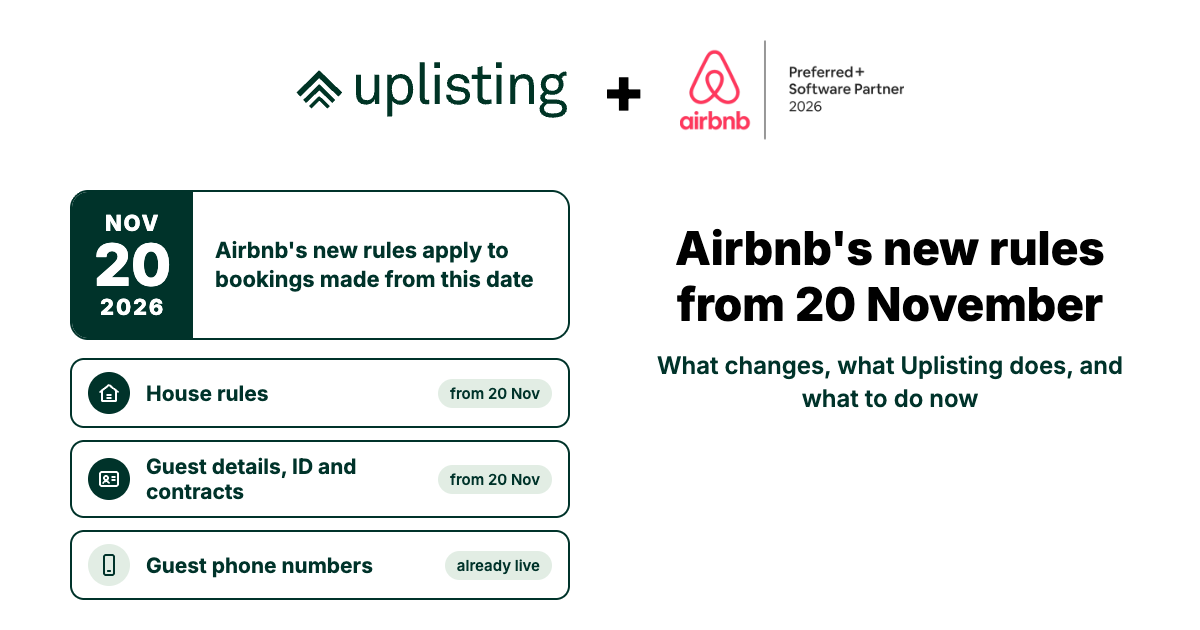
Two Airbnb policies apply to Airbnb bookings made on or after 20 November 2026, and guest phone numbers have already changed. Here is what each one covers, what Uplisting changes, and what to do before 20 November.
Please read this first. This guide is our reading of Airbnb's policies as published on 5 November 2026. It isn't legal advice. Airbnb's policies apply to you as the host, and you are responsible for following them on your listings. Airbnb's own pages, linked throughout, are the final word. If Airbnb changes its policies or gives us more detail, we'll update this page.
At a glance
Policy
Applies to
What it means
Source
House rules
Airbnb bookings made on or after 20 November
Rules must be in your listing's house rules section when the guest books. No effortful chores and no fines.
Each section below has the full checklist and where to make each change.
If you do nothing, Uplisting still switches these off for Airbnb on 20 November. Your house rules, checkout tasks and automated messages stay exactly as they are, so check them yourself: Airbnb may flag them.
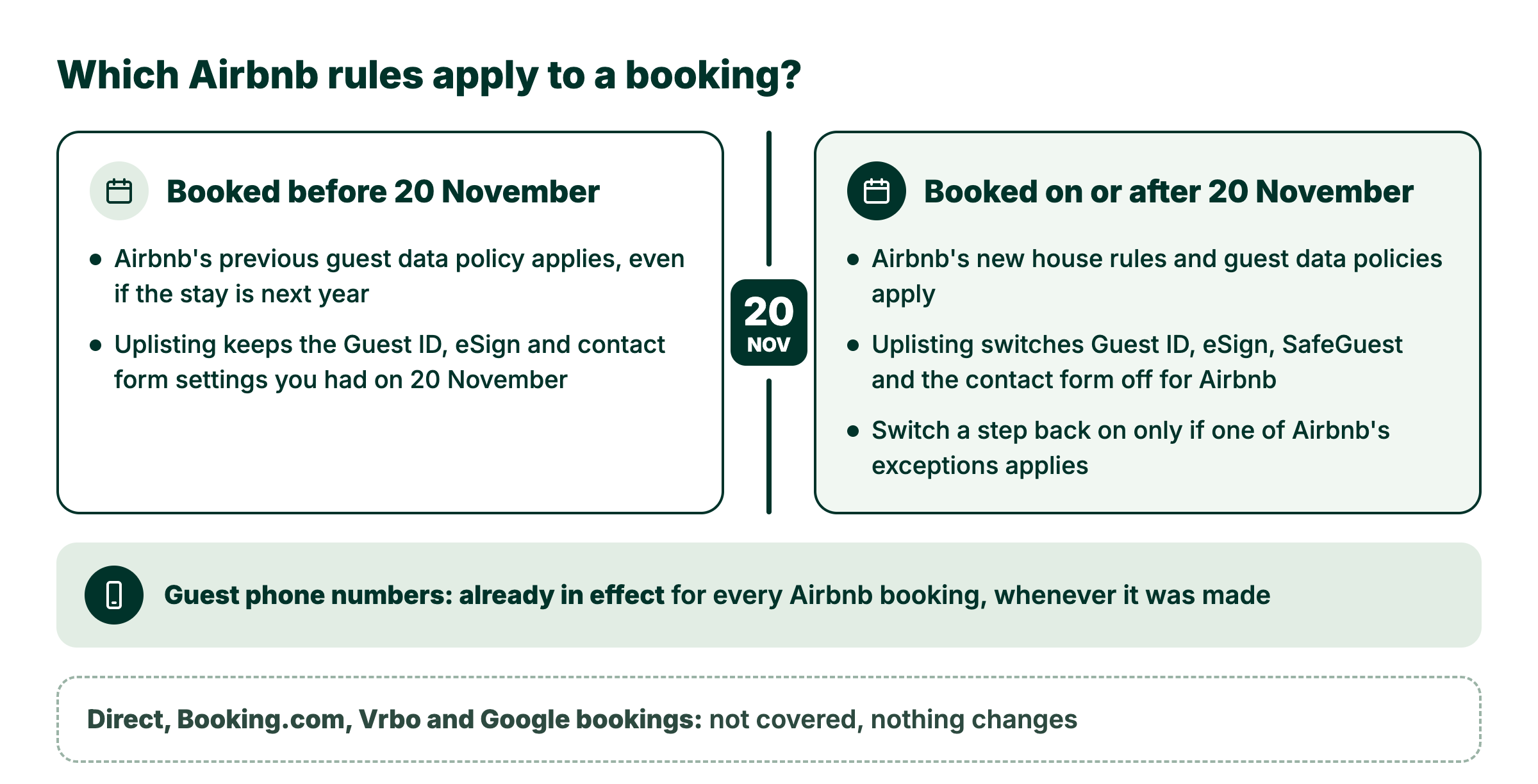
What is and isn't covered
Booking
What applies
Airbnb, booked on or after 20 November 2026
Both new policies apply, whatever the dates of the stay.
Airbnb, booked before 20 November 2026
Airbnb's previous guest data policy applies, even if the stay is next year. It is shown at the bottom of article 4169, and it already limited asking for ID photos before arrival and for contact details to legal or compliance reasons, and required agreement terms in your listing description.
Your own website, Booking.com, Vrbo, Google
Airbnb's policies don't apply to these bookings. Each channel has its own rules.
Guest phone numbers
Already in effect for Airbnb reservations arriving in Uplisting now, in every country.
Who Airbnb holds responsible. Airbnb enforces these policies against the host's listings and account, whatever software the host uses. The only exception Airbnb publishes for software-connected hosts is in its payment policy (article 2799): "select software-connected hosts" may collect a security deposit or mandatory fees off Airbnb, if the amount is in the right fee field before booking. There is no exception for ID checks, contact details or rental agreements sent through software.
1. House rules (article 4168)
Airbnb now has seven standard house rules: maximum overnight guests, quiet hours, events, pets, smoking, commercial photography, and lock up at checkout. Anything else you ask of guests goes in your Additional rules (Airbnb is renaming "Requests" to "Additional rules" in its app over the coming weeks). Airbnb removed the separate checkout instructions section from the Listing editor, so re-add any checkout requests you still need under Additional rules, Before checkout.
For Airbnb bookings made on or after 20 November, article 4168 says house rules must, among other things:
Be in your listing's house rules section when the guest books. Rules elsewhere in the listing, such as the description, don't count. You can't add new rules after booking, "including by message, signs in the home, or in person". A message can remind guests of a rule that is already there.
Be consistent with the rest of your listing and with Airbnb's policies.
Be reasonable. Hosts generally can't ask for tasks "that require significant effort or time, or would typically be performed by a cleaner", such as stripping the bed, taking rubbish off-site, or washing and putting away dishes.
Not include fines. Hosts are generally not allowed to "impose fines or other penalties on guests". If a community association, building or local government might fine you, you can tell guests at the bottom of your house rules section. If a guest causes such a fine, you can ask them to reimburse you through Airbnb's Resolution Center.
Not restrict anything your listing advertises. Fees for an advertised feature must be in the price at booking. You can describe optional paid add-ons, like breakfast.
Remove sheets from the bed or start a load of laundry
Separate rubbish and recycling into the designated indoor bins
Take rubbish off-site
Turn off the air conditioning when they leave
Avoid using an amenity your listing advertises
Airbnb looks at each listing's context and may allow exceptions, such as asking guests to limit showers because of local drought-related water restrictions, or to use animal-proof bins in bear country.
Before and after
Enforcement. Airbnb's first reviews of house rules run from 20 November to March 2027. If a rule is flagged, you'll have at least 20 days to update it or appeal. You can appeal only once, so include evidence such as a local ordinance or HOA rule. Airbnb may also issue warnings; if a problem continues, it may show guests a notice on your listing, reduce your listing's visibility in search, or take other action. If a guest breaks one of your house rules during a stay, or says before check-in that they intend to, you can cancel without fees or other consequences.
Where each house rule is set
Some of Airbnb's house rules are set in Uplisting and sent to Airbnb. The rest are set only in Airbnb.
House rule
Where to set it
How it reaches Airbnb
Pets (and the maximum number of pets), events, smoking
Uplisting › your property › Details › Listing suitability
Sent to Airbnb when you save a change. Change them in Uplisting, not Airbnb: the next change you save in Uplisting overwrites Airbnb.
Check-in and checkout times
Uplisting › your property › Details › Check-in and out times
Sent to Airbnb when you save a change.
Lock up at checkout, and requests before checkout
Uplisting › your property › More settings › Checkout tasks
Sent each time you save the checkout tasks. Airbnb is moving checkout requests into its new house rules, so check your listing in Airbnb shows them under Lock up and Additional rules › Before checkout, and add them there if not.
Maximum overnight guests, quiet hours, commercial photography, and any other additional rules
Uplisting doesn't send these, and doesn't change them.
Your checklist: house rules
What Uplisting does
Nothing changes automatically on 20 November. Uplisting doesn't rewrite your house rules, checkout tasks or automated messages.
Sends the rules you set in Uplisting to Airbnb when you save them: pets, events, smoking, check-in and checkout times, and checkout tasks (see the list above).
What you must do
#
Action
Who
Where
1
Review the house rules on each Airbnb listing. Remove chores and fines, and keep only requests like the "can ask" list above.
Move rules into your house rules section. Any rule that only appears in your messages, guidebook, signs, listing description or rental agreement doesn't count. Leave out fines, penalties and chores.
If you have rules outside your house rules section
Remove chores from checkout tasks on each property, then save so the change reaches Airbnb.
If you set checkout tasks in Uplisting
Uplisting › your property › More settings › Checkout tasks
5
Edit automated messages sent to Airbnb guests. Remove checkout chores, fines, charges for leaving the home untidy and any rule that isn't already in your house rules.
Update or appeal any rule Airbnb flags within the time Airbnb gives you, at least 20 days. You can appeal only once, so attach your evidence.
If Airbnb flags a rule
Airbnb's email or the Listing editor
What you can do
Remind guests of rules already in your house rules by message, for example the day before checkout. Where: Uplisting › Outbound › Messages.
Tell guests about possible third-party fines from a building, community association or local government, at the bottom of your house rules. If a guest causes one, ask for reimbursement through Airbnb. Where: Airbnb Listing editor › House rules; Resolution Center.
Give the jobs guests no longer do to your cleaners, such as stripping beds and washing dishes, and check your cleaning fee still covers them. Where: Uplisting changeover checklists (how to set them up).
2. Guest details, ID and contracts (article 4169)
For Airbnb bookings made on or after 20 November, article 4169 says that, with limited exceptions, "hosts may not solicit personal data at any point during the booking process or stay". That includes:
Contact details, such as a phone number, home address or email address
ID details or documents, such as a passport, driving licence or photo
Card or bank details, except where Airbnb's payment policy allows it
Background checks or credit history
Biometric or health data, such as fingerprints, facial recognition or medical records
Hosts also may not:
Require guests to use a third-party app or register on another website to get into the listing or use a critical amenity. Keyless entry apps are fine if you offer another way in when a guest asks.
Use Wi-Fi log-in pages that ask for a guest's email address or other personal details, unless an exception applies.
Ask guests to review the stay or fill in a survey on a separate website.
The exceptions for guest details and ID
You may collect personal information only where it is needed to:
Comply with applicable law, or a documented rule of your community association, such as an HOA or building security requirement.
Get an allowed contract signed, and then only what's needed to sign and share it.
If one applies, say in your listing's Additional rules what you need from guests and why, so they see it before booking. You may not collect more than the law or rule calls for, you are responsible for storing and disposing of the data securely, and Airbnb may ask you for evidence.
Checking ID in person is still allowed at check-in, if your listing's Additional rules say so. You may not keep a copy unless one of the exceptions above applies.
Rental agreements
Hosts "generally may not ask guests to sign a separate contract or rental agreement", unless it is:
Required by law, by community association rules (such as an HOA or building security), or by your insurance provider
Needed for an optional extra, such as a golf cart rental
For a stay of 28 nights or more
For an Airbnb Luxe listing
These reasons allow an agreement, not ID checks. An allowed agreement must be added to your listing: in Airbnb's Listing editor go to Settings › Contract, choose why you need it and upload a PDF (article 2824). Contracts are visible to the public, so remove personal information, and you can't ask a guest to sign a contract that wasn't on your listing when they booked. Airbnb doesn't require guests to sign host contracts and doesn't help enforce them.
Enforcement. If Airbnb finds a host broke this policy, it may educate or warn the host, suspend or remove listings, or suspend or remove the account for repeat offences.
What changes in Uplisting
On 20 November Uplisting records your settings for Airbnb, then switches the steps below off for Airbnb. Airbnb bookings made before 20 November keep the settings you had on that day. Other channels don't change.
Off for Airbnb bookings made on or after 20 November. If you switch it back on, every Airbnb booking gets the agreement. If 28+ night stays are your only reason, leave it off: shorter stays would get an agreement Airbnb doesn't allow.
Continue. Airbnb's offline security deposit field shows your deposit, rounded up to a whole amount, so guests see it before booking.
SafeGuest (verification link, and deposits if SafeGuest holds them)
Off for Airbnb bookings made on or after 20 November, so no SafeGuest link and no SafeGuest deposit. Airbnb's offline security deposit is set to 0 for properties whose deposit SafeGuest holds. Bookings that already have a SafeGuest link keep it.
Contact form on the guest booking page
Off for Airbnb bookings made on or after 20 November, so Airbnb guests are no longer asked for their email and phone.
Messages that wait for Guest ID or a signed agreement
On Airbnb bookings made on or after 20 November they send without waiting, because the step is off.
Messages that wait for a deposit or SafeGuest
On Airbnb bookings made on or after 20 November, a message waiting for SafeGuest won't send. One waiting for a deposit still waits. Remove these conditions from check-in messages (see the checklist below).
Airbnb guests never see the contact form's marketing opt-in. That was already the case.
Your checklist: guest details, ID and contracts
What Uplisting does
Records your Airbnb settings on 20 November, so Airbnb bookings made before that date keep them.
Stops SafeGuest deposits on new Airbnb bookings, and sets Airbnb's offline security deposit to 0 where SafeGuest holds your deposit.
Keeps taking deposits that Uplisting holds, and shows the amount in Airbnb's offline security deposit field, rounded up.
Sends messages that waited for Guest ID or a signed agreement without waiting.
Asks which of Airbnb's exceptions applies whenever you switch a step back on for Airbnb.
What you must do
#
Action
Who
Where
1
Remove requests for guest details from Airbnb messages. Take out any request for ID, a phone number, an email address or a form, and any link asking guests to review the stay or fill in a survey outside Airbnb.
Never make door codes wait for a step. Remove conditions such as "deposit authorised", "SafeGuest" or "Guest ID verified" from messages that send door codes or check-in details to Airbnb guests. After 20 November a message that waits for SafeGuest won't send on new Airbnb bookings, so guests won't get their code.
Check the deposit Airbnb shows guests. Make sure Offline security deposit, under Airbnb fees, matches your deposit. If you keep part of a deposit, be ready to give the guest a written explanation and evidence. Don't keep a deposit as a penalty.
Guest ID or contact details: only if a law or a documented building or HOA rule requires them. Say in your listing what you collect and why, collect only that, and keep the evidence. Where: Airbnb Listing editor › House rules › Additional rules.
Rental agreement: upload it to your listing first, with personal information removed. It applies only to bookings made after you upload it. Who: if a law, building rule, insurer, optional extra, 28+ night stays or Luxe requires one. Where: Airbnb Listing editor › Settings › Contract (article 2824).
What you can do
Switch Guest ID or SafeGuest back on for Airbnb from 20 November, if an exception applies. It applies to every new Airbnb booking on your account. Where: Protection › Settings (if you don't see Protection, Automate › Guest identity and deposits).
Switch eSign rental agreements back on for Airbnb from 20 November, if an exception applies. If 28+ night stays are your only reason, leave it off: shorter stays would get it too. Where: Automate › eSign rental agreements.
Switch the contact form back on for Airbnb from 20 November, if an exception applies. Where: Automate › Guest booking page.
Switch steps off for Airbnb now instead of waiting. This also stops them on Airbnb bookings you already have. Where: the same three pages.
Check ID in person at check-in, if your Additional rules say so, without keeping a copy. Where: Airbnb Listing editor › House rules › Additional rules.
3. Guest phone numbers (article 3764)
Airbnb no longer shares guests' real phone numbers with connected software "in any country or region" (article 3764).
US and Canada: eligible reservations come with a temporary Airbnb number. It expires 48 hours after checkout, or straight away if the booking is cancelled. If the guest or the host books from outside the US and Canada, there is no temporary number.
Everywhere else: Uplisting receives no phone number for the guest. You can still see the guest's number in the Airbnb app or on Airbnb's website.
Airbnb lets hosts ask for a guest's phone number only in limited cases, such as when local law, HOA rules or building security rules require it.
Bookings already in Uplisting keep the number we have, unless Airbnb sends a temporary number for them.
Your checklist: guest phone numbers
What Uplisting does (already live)
Smart lock codes: for 4-digit codes, Uplisting uses the code Airbnb suggests (the last four digits of the guest's real phone) where it can. If that code isn't accepted, for example because it contains a 0 or repeated digits, Uplisting picks a random code. The {lock_code} tag in a message shows the code Uplisting created for the booking.
SMS: Uplisting can text a new Airbnb guest only when Airbnb sends a temporary US or Canada number and the guest agrees. On a booking's messages, Send request writes a message for you to send in Airbnb messages, asking the guest to reply TEXT ME.
What you must do
#
Action
Who
Where
1
Replace phone digits with the lock code tag. Swap "use the last 4 digits of your phone" and {guest_phone_last_4_digits} for {lock_code}. How the tag works: Uplisting smart locks.
Ask US and Canada guests to agree to texts with Send request. Where: Uplisting › the booking › Messages. Use the web app: the mobile app sends the old request until its next update.
See a guest's real number when you need to call them. Where: the booking in the Airbnb app or on Airbnb's website.
Questions
Does this affect bookings I already have?
Airbnb bookings made before 20 November stay under Airbnb's previous policy, and Uplisting keeps the Guest ID, agreement and contact form settings you had on 20 November for them. Phone numbers and lock codes have already changed for all Airbnb bookings.
Which time does "20 November" mean?
Uplisting uses midnight UTC at the start of 20 November and the booking date Airbnb sends us.
Can I still take security deposits on Airbnb bookings?
Airbnb allows "select software-connected hosts" to collect a deposit off Airbnb if the amount is in the right fee field so guests see it before booking, and to release it within 7 days of checkout if there's no damage or other charges (article 2799). Uplisting keeps taking deposits it holds and shows the amount in Airbnb's offline security deposit field.
Can I still check ID?
In person at check-in, if your listing says so, without keeping a copy. Before arrival, only where a law or a documented building or HOA rule requires it, and only the details it requires.
Can I still text Airbnb guests?
From Uplisting, only on US and Canada bookings that come with a temporary number, once the guest agrees. Elsewhere Uplisting has no number; the guest's number is still shown in the Airbnb app and website.
Can I ask guests to load the dishwasher?
Airbnb rules out washing and putting away dishes and allows putting used dishes in the sink. It doesn't mention dishwashers, so "put used dishes in the sink" matches Airbnb's own example.
Can I remind guests of my house rules by message?
Yes, if the rule is already in your listing's house rules section. A message can't add a new one.
Do I need to change anything for Booking.com, Vrbo or direct bookings?
Not for Airbnb's policy. Uplisting doesn't change your settings for those channels.
Does Airbnb treat software-connected hosts differently?
Only in two published ways: "select software-connected hosts" may collect deposits and mandatory fees off Airbnb, and Airbnb no longer shares guests' real phone numbers with connected software.
What if Airbnb flags one of my listings?
Follow Airbnb's instructions in the Listing editor or its email. For a house rule you have at least 20 days and one appeal. If you think Uplisting caused it, contact our support team.
✅ Thank you! Your form was submitted successfully.